Ranked the “#1 Digital Marketing Firm in America”







10X Your Business – Drive More Leads and Sales
Grow your business, get more customers and beat your competition – find out how.

SocialSEO Offers:
SEO Services
Social Media Marketing
Paid Search
Email Marketing Services
Conversion Rate Optimization
Amazon Marketing
Influencer Marketing
Video Production
Content Strategy
What benefits do I get?
Demand the Very Best – SocialSEO
What problem are you trying to solve?
Why do my competitors rank higher than me on Google? I’ve been in business much longer. What does it take to get to the top?
Just because you’ve been in business longer doesn’t mean your digital marketing is stronger. In fact, a strong SEO campaign can quickly help your competition outrank you online, even if you’ve been on the top of the first page before. Below are just a few reasons why your competition may rank higher, even if their site seems worse than yours.
- Their site is more relevant, matching user intent better
- By understanding which questions users are asking, or what Keywords they are searching for on Google, your competition can tailor the content of their site to the intent of the user. This makes it more relevant to the keyword searched, satisfying both their customers and Google.
- Their site is more prominent online
- It’s much more than what’s on your site. Profiles on sites like Yelp, Facebook, and industry specific directories not only puts your business’ information on more places across the web, but builds a strong profile of links pointing to your site, both of which help visibility within the search engines.
- Users and Google like their site more
- Not only does your content need to be easy to read and your site simple to navigate for your customers, but Google needs to be able to do the very same. If either one cannot find the information they need in a timely manner, both your human and robotic audience will favor other sites.
How do I get my local business listed in the 3 Google Maps listings?
If you can get your business listed in the Google Maps Pack (i.e. 3 Pack, Map Pack, Local 3 Pack) you have essentially hit SEO gold. Here at SocialSEO, this is what we suggest to score one of those coveted spots:
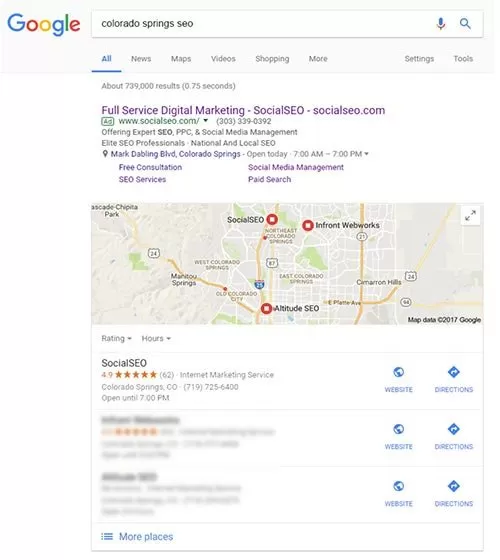 #1 – The Optimal Location: The physical location is a large component of the map pack and the closer you are to downtown or the closer the searcher is to you the more likely your listing is to show in the Map Pack. Since you can’t change the physical location of your business targeting optimized keywords in titles and categories of your website is essential.
#2 – Google My Business Profile: Ensure that your Google My Business profile is optimized and that you have exact information for your NAP (name, address, and phone number) score on your website as your Google profile. Add images that show the products, services, or concepts you provide and include informative descriptions and keyword phrases in your description to fully optimize your profile. You can also build links that point to your Google My Business profile to increase your chances.
#3 – Build Citations: Continue to build new listing profiles to increase the strength of not only your website, but also your brand name. The more links that you have pointing back to your webpage, the better. This includes reviews from previous customers. Gradually update directories that are most applicable to your service or industry, including:
- Yelp
- Yellow Pages
- Better Business Bureau
How long does SEO take and when will my phone start ringing?
Search engine optimization (SEO) is not a magic wand that will, with a simple wave of the hand, magically land your business website at the top of search engine results. If it were that simple, everyone could do it. There are many layers of knowledge involved in properly executed, effective SEO. Google, the world’s foremost search engine, uses more than 200 separate ranking factors to decide where a web page will place in its results. Search engine optimization is an involved, multi-level process, not a singular action, which requires expert knowledge and proper management to deliver positive results for your business.
Since properly executed search engine optimization involves much more than merely making a few adjustments to your site or adding a few keywords and phrases to your existing content, there is no definitive answer to the question of how long it takes before you will see results. Google’s constantly changing algorithms and other industry changes require the services of a knowledgeable SEO firm to keep your website up to date, competitive in your industry, and bringing in new business. A reputable SEO firm will tell you that it normally takes a minimum of between four and six months to see positive results from a solid SEO strategy that has been properly implemented and managed.
At the end of the day, a professional SEO firm will focus on all the factors that will help increase your business over the long haul, and manage those issues effectively. Search engine optimization is a full-time endeavor requiring dedicated individuals with the training, knowledge, and expertise to make the internet work for you.
With the right SEO firm working on your behalf, you will have a team of experts with the technical resources, tools, and information it takes to improve not only your position in search results, but your bottom line, as well.
It sounds like there are big changes in pay-per-click? Apparently, there has been somewhat of a "PPC rebirth" and marketing can be much more targeted and cost-effective than it used to be? What's the story here?
The Paid Search Renaissance
Have you had experience with Pay Per Click (PPC) in the past? The odds are that you ended your campaign with less money and little to no results. Unfortunately, this is the experience of many business owners who used PPC in the early days. A combination of inexperienced marketers and a relatively new advertising medium caused many people to turn their back on paid search completely.
Today’s Pay Per Click landscape is very different from years past. The reach and engagement of today’s paid search extend much further than just Google Search.
Also, the content is far more entertaining than just a simple text advertisement. You can now use PPC to deliver multimedia advertisements; such as video, images, Text messages, and much more.
The real magic starts when you combine the power of Google’s big data with the new advertising types. You can couple peoples, income, search habits, frequently visited sites, interests, and more. This takes paid search far beyond simple Keywords and search ads. Now you can make finely tailored campaigns that are designed to reach people on a more personal level. Modern PPC taps into the sites that your clients already commonly visit and continues your advertising message as they flow in and out of Google. Making sure you stay top of mind across the internet.
We urge you to consider giving PPC a second chance, you’ll be glad that you did.
How can I leverage social media for my business? Is it a "fad" or does it really work?
There’s no questioning the power and magnitude of social media. Here are some incredible figures provided by Statista, in case you’re not convinced:
- 1.93 billion monthly active Facebook users
- 700 million monthly active Instagram users
- 90% of marketers use social media to market their businesses
- 42.17% of US consumers say social media significantly influences their purchasing decisions
There are a lot of users to connect with and your competitors are already using social media to reach them. Social media ROI is unbelievably incomparable to other avenues of advertising. Cost per clicks can be as little as $0.10 on Facebook, versus a CPC of $1-2 and sometimes higher with paid search. To maximize ROI, you need to:
- Define your goals & how to measure them
- Know your market & audience
- Engage with your audience & be personable
- Construct eye-catching, high quality content
- Develop unique advertising & targeting strategies
Integrating social media into your marketing plan can bring you an abundance of benefits. It can boost your website’s SEO, find customers you couldn’t reach before, generate sales and leads, and much more! Social media platforms are today’s most interactive digital avenues that capture the personality of brands to successfully build relationships with current and potential consumers. With exponential growth across the board over the last few years, including an estimated advertising revenue of $41 billion for 2017, we’re confident in saying that social media is not a fad. It’s time to get social!

I need a complete digital marketing team. Who will I be working with?
Don’t Be Sold… Start a Conversation
Let’s chat about what you want to achieve – and see what others are doing to succeed.
As Seen On…
Our Customer Reviews Say it All
See for yourself what our customers are saying

Brands We Have Worked With
Stop Losing Customers to Your Competition